On most projects the structure exists twice. Once as geometry in the CAD model, and once as numbers in a scantling calculation — a spreadsheet, a standalone rule tool, or a set of hand-written sheets. Keeping them in sync is where the hours go and where the mistakes come from.
The problem: two versions of the same boat
A panel's short side is scaled off a section drawing. Its longitudinal position is estimated as a fraction of the rule length. The deadrise at that station is measured with a protractor on a printout. The plate thickness in the calculation is the one that was current three revisions ago. None of these are hard to get right — all of them are easy to get slightly wrong, and a slightly wrong x/L or deadrise angle quietly changes a design pressure.
Then the hull changes — a chine moves, a frame spacing is adjusted, a deckhouse grows — and the calculation does not change with it. It stays valid-looking and wrong until somebody thinks to check.
The solution: the calculation lives on the geometry
Notilus Scantling runs as a panel inside Rhino. Structural elements are not described to the software; they are selected in the model. Each element is linked to the object it represents, and the inputs the class rules need are measured from that object.
Nothing is transcribed, so nothing is transcribed wrongly.
The workflow, end to end
1. Set the vessel data and the rule set. Main dimensions, displacement, speed, hull type and design category go in once. The rule set chosen here — the applicable class or standard rule family — decides every formula that follows: design areas, pressure equations, allowable stresses and the clause references in the report.
2. Define elements from the geometry. Select one object or fifty, and the definition dialog creates one element per object, measuring each separately. What comes from the model rather than from a keyboard:
- longitudinal position and height above baseline
- panel short and long sides, measured along the plating surface rather than across the chord — which matters on a warped hull panel
- local deadrise angle
- as-built plate thickness
- web and face-plate dimensions of stiffeners and girders
The design area is suggested from where the object actually sits, so a deep-V forefoot panel is recognised as bottom, not side. On a multi-selection, any field that differs between objects is shown as <varies> and left alone unless you deliberately set it for all of them.
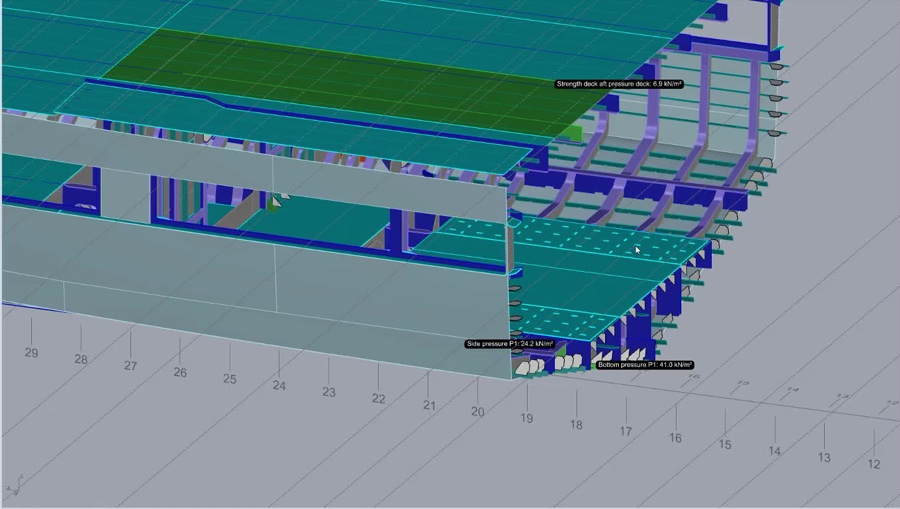
3. Calculate and read the result on the model. Every linked object is coloured by utilisation, and design pressures can be annotated directly on the geometry. The structure that is working too hard is visible as a shape in the model, not as a row number in a table.
4. Change the model — and re-check it. When geometry moves, geometry is re-read. Pull geometry refreshes every linked element from its current object; Re-check from model compares the model against the stored project values and shows you exactly what drifted, so you decide what to accept. The calculation follows the boat instead of falling behind it.
5. Report. Requirements, as-built values, utilisations and status, with the clause each requirement came from — so any result can be traced back to the printed standard by a reviewer who has never opened Rhino.
Two standalone commands cover the quick jobs: a single-object check that drops the required value and status straight onto a plate, girder or frame, and a section-properties command that returns area, neutral axis, inertia and section modulus from closed planar curves.
Preparing the model for Notilus Steeler
The scantling stage does more than produce a report. Because each element is attached to its object, the verified decisions — plate thickness, profile, spacing, span, design area — travel on the model, stored on the objects themselves.
That model is the starting point for detailed structural modelling in Notilus Steeler. Plate thicknesses and stiffener profiles are already decided and already checked before the production model is built. You are not modelling structure and hoping it passes, and you are not rebuilding a nested, detailed model because a check came back over-utilised after the fact. The geometry that was verified is the geometry that gets developed.
What actually changes
The gain is not only speed, though a set of panels defined by selection instead of by measurement is faster by a wide margin. The gain is that the calculation and the boat can no longer disagree without telling you. Position, dimension and thickness are read from one source, the model is re-readable at any time, and the structure that goes into detailing has already been checked against the rules on the same geometry it was drawn on.
Notilus Scantling supports published class and standard rule sets for metal hulls, with clause-by-clause reporting. See the documentation for the full command reference and walkthrough videos of each step.